
You enter a .onion address in Tor Browser, wait for it to connect, and instead get “Onionsite Not Found.”
The message sounds straightforward, but it doesn’t necessarily mean the onion site no longer exists. The address could be outdated, the onion service could be temporarily offline, Tor may be unable to reach it, or the URL itself could be incorrect.
The useful question isn’t simply “Is this onion site down?” — it’s where the connection is actually failing.
That’s what we’ll break down below.
What Does “Onionsite Not Found” Actually Mean?
You enter a .onion address into Tor Browser, wait for the page to load, and instead see a message saying “Onionsite Not Found.”
The wording makes it sound as though Tor searched for a website and simply couldn’t find it. But onion services don’t work quite like ordinary websites, so the message needs a little context.
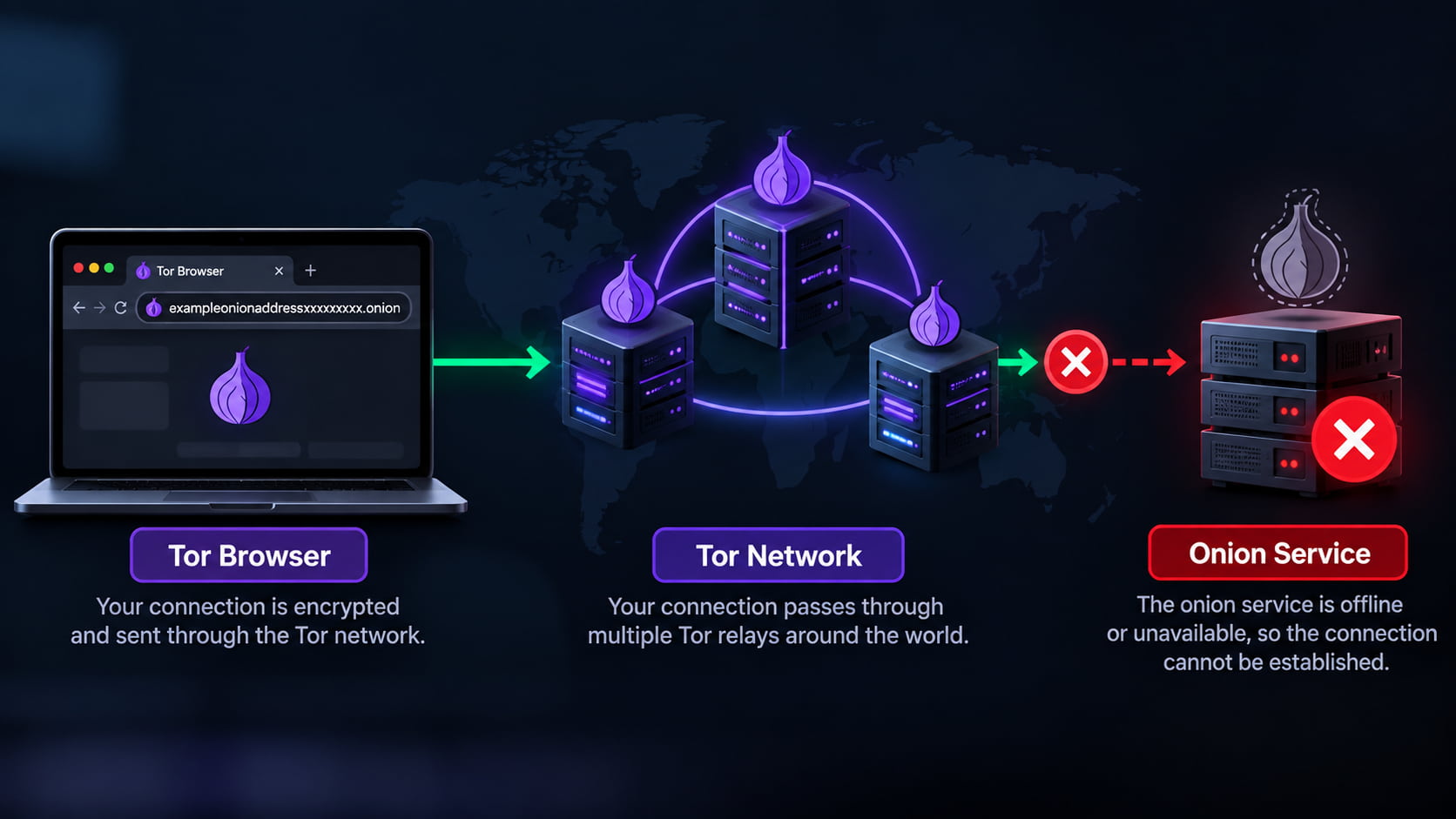
When you enter a .onion address, Tor Browser doesn’t send that address through the normal DNS system used for domains such as .com or .org. Instead, it uses the Tor network to locate the onion service associated with that particular address and establish a connection to it.
If that process can’t be completed, the onion service becomes unreachable from your browser.
That can happen for several reasons. The address might contain a mistake, the service could be temporarily offline, you may be using an outdated address, or there could be a problem establishing the Tor connection.
So an “Onionsite Not Found” Tor Browser error doesn’t automatically mean the website has permanently disappeared.
A better way to read the message is:
Tor Browser couldn’t reach the onion service associated with the .onion address you requested.
That’s an important distinction. An unreachable .onion address tells you that the connection failed, but it doesn’t yet tell you why it failed.
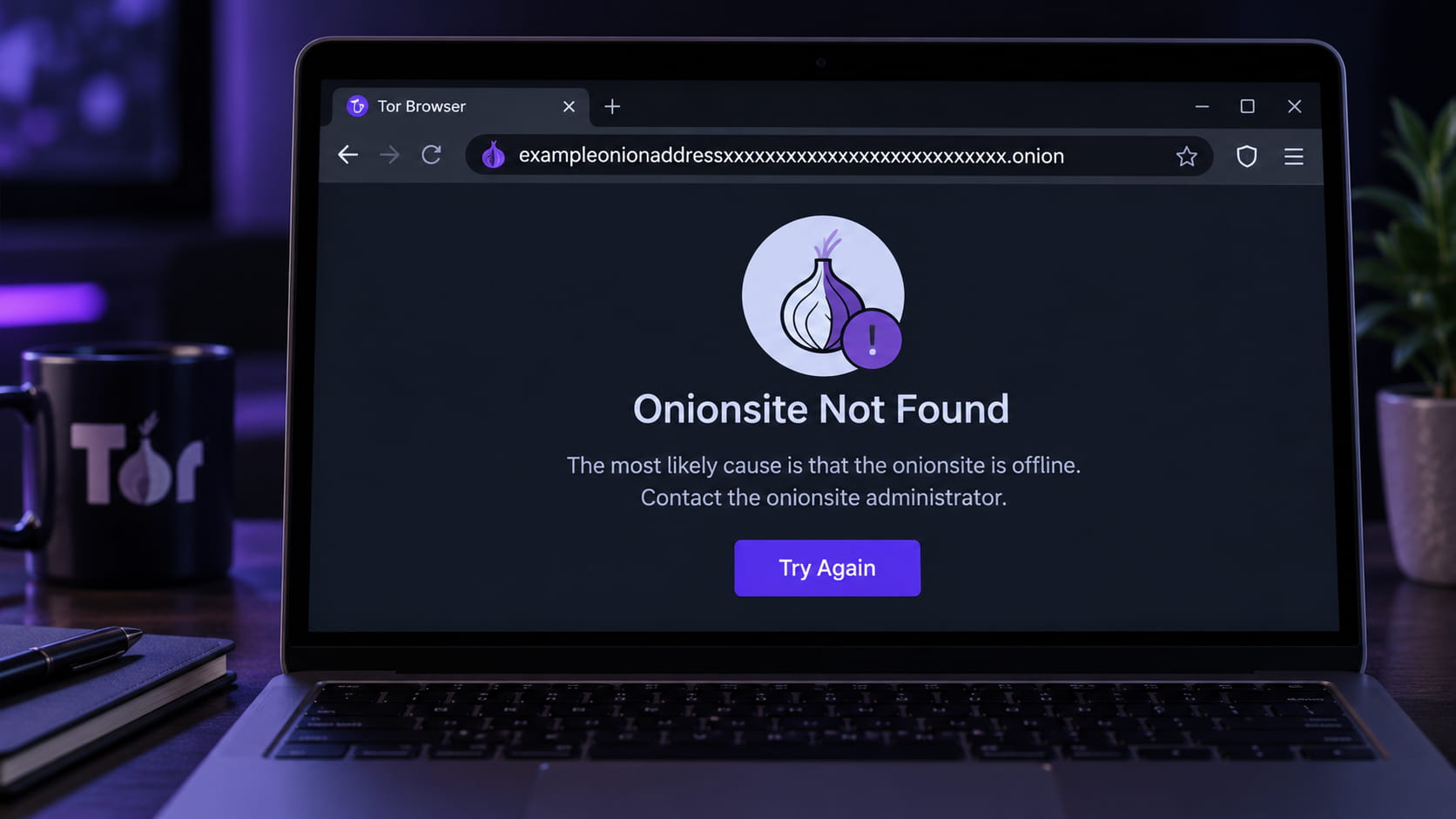
Why Does Tor Browser Say “Onionsite Not Found”?
There isn’t one single explanation for an “Onionsite Not Found” message. Two people can see the same error while dealing with completely different problems.
Sometimes the problem is as simple as a mistyped address. In other cases, the address is correct but the onion service behind it is no longer reachable. Understanding the difference matters, especially before assuming that a site has permanently disappeared.
The .Onion Address Is Incorrect
Modern .onion addresses are long for a reason, but that also makes them easy to copy incorrectly.
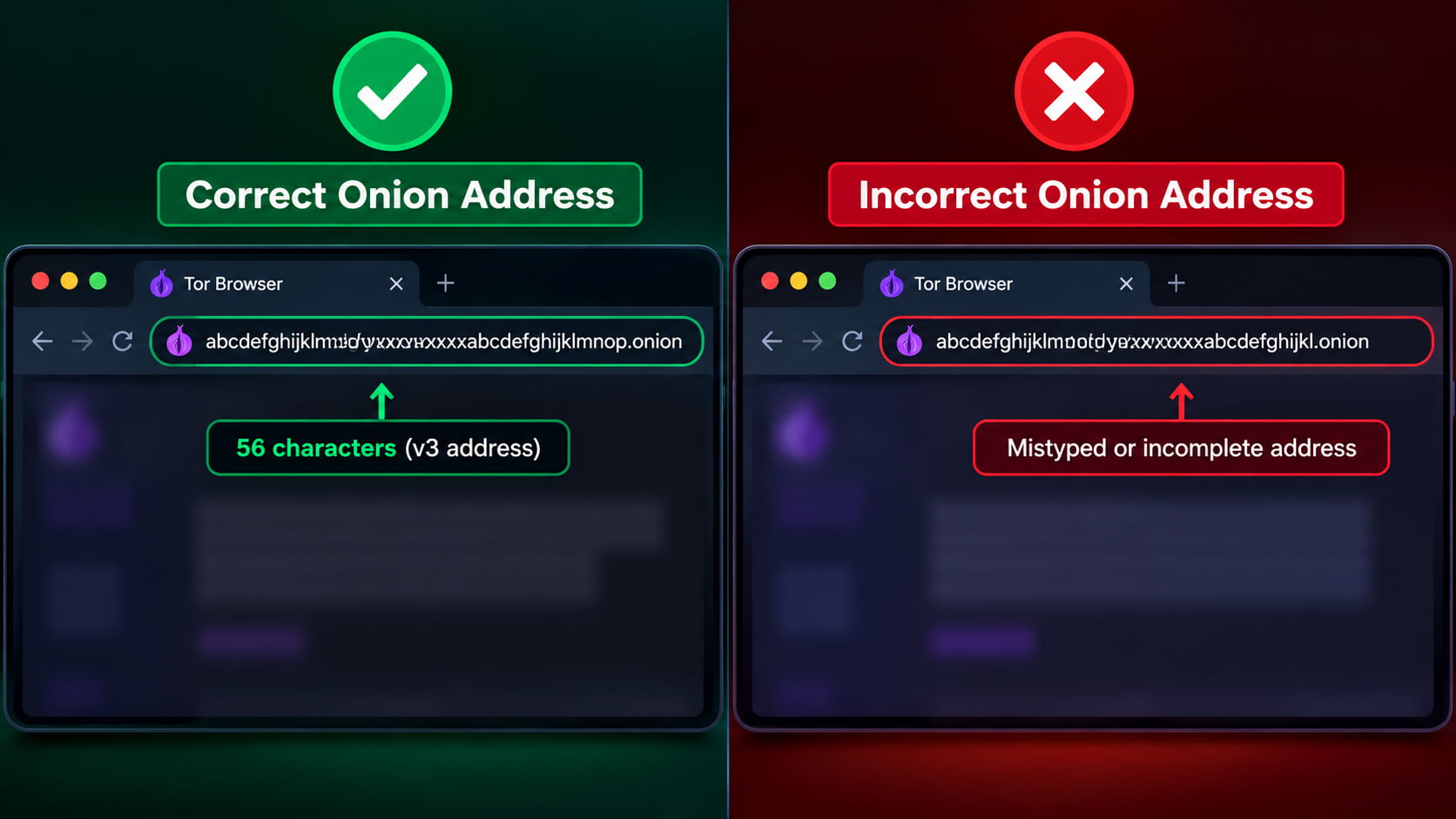
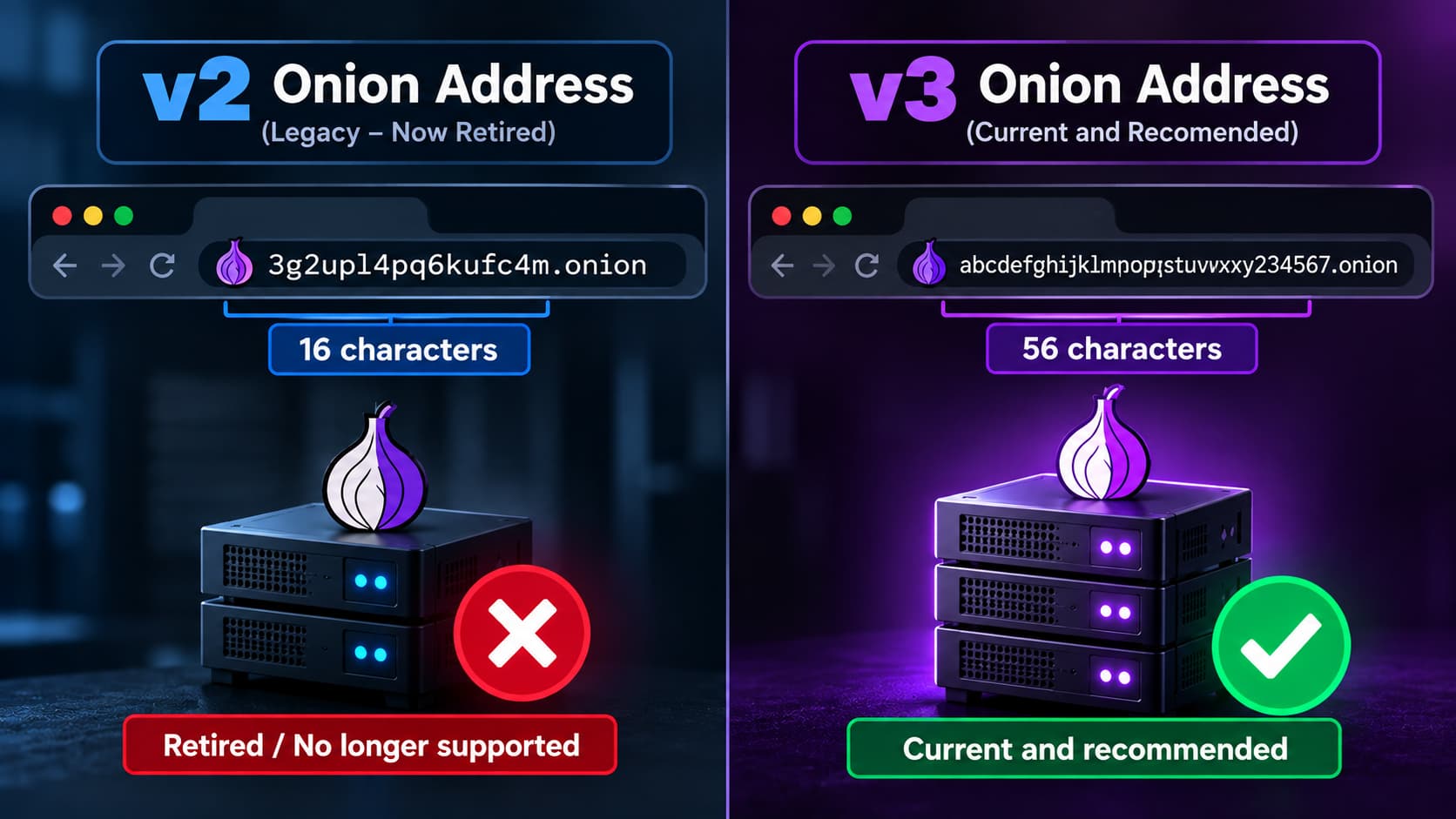
Modern v3 onion addresses are much longer than the older addresses Tor once used, containing 56 characters before .onion. Those characters aren’t simply a human-friendly domain name chosen in the same way as example.com; the address is cryptographically derived and tied to the onion service.
That means a small typo isn’t necessarily a small mistake.
If even one character is missing, changed, or copied incorrectly, you no longer have the original address. Tor Browser may reject an invalid address or be unable to reach the onion service you intended to visit.
This is especially easy to encounter when an address has been copied manually, broken across lines, or taken from an old post rather than directly from its source.
Before troubleshooting anything more complicated, compare the entire .onion address, not just its beginning and ending.
The Onion Service Is Offline
A .onion address can be completely correct and still not work.
An onion service ultimately depends on infrastructure somewhere. If the system hosting that service is shut down, undergoing maintenance, experiencing a network problem, or otherwise unavailable, Tor cannot establish the connection simply because you have the correct address.
This is an important distinction:
A valid onion address does not guarantee that the onion service is currently online.
The situation can also be temporary. A service that produces an error now may become reachable again later without its onion address changing at all.
For the visitor, however, temporary downtime and a service that has vanished can initially look very similar.
You’re Using an Old or Outdated Onion Address
Sometimes the service is still running — just not at the address you have.
An organization may replace an onion service, migrate infrastructure, or begin publishing a different official onion address. The problem is that the old address doesn’t immediately disappear from everywhere else on the internet.
It may remain in:
- old bookmarks,
- outdated articles,
- onion directories,
- forum discussions,
- archived pages,
- or search results pointing to older information.
This is one reason finding a .onion address somewhere online isn’t enough to establish that it is the current official address.
If an onion service you previously used suddenly becomes unreachable, check whether the organization itself publishes a current onion address through its official website or documentation. Avoid assuming that a random “updated link” posted elsewhere is genuine.
The Site Used an Old V2 Onion Address
The age of the address itself can sometimes explain the problem.
Older Tor onion services used what are now known as v2 onion addresses. They were noticeably shorter, with 16 characters before .onion.
Tor later introduced the more secure v3 onion-service protocol, which uses the much longer 56-character addresses people commonly encounter today. Support for the old v2 onion services was removed from Tor, meaning those old addresses are no longer supported by current Tor Browser versions.
This matters because old v2 links haven’t vanished from the ordinary web.
You can still encounter them in years-old articles, abandoned directories, screenshots, forum posts, bookmarks, and other archived material. Someone discovering one today might reasonably assume the onion site is simply experiencing downtime when the real problem is that the address belongs to a retired onion-service protocol.
A 16-character .onion address is therefore a strong indication that you’re looking at an obsolete v2 address, not a current v3 onion service.
Your Tor Connection Is Having Problems
Not every failed onion connection is caused by the website.
A useful clue is how widespread the problem is.
If one particular onion service won’t open while other known onion services load normally, that points more strongly toward a problem involving that specific address or service.
If multiple unrelated onion services suddenly fail to load, the situation is different. Your Tor Browser may not be properly connected to the Tor network, your network may be interfering with Tor connectivity, or there may be another local connection problem.
That distinction can save a lot of unnecessary troubleshooting.
One onion site failing and every onion site failing are not the same problem.
Before deciding that an onion service is gone, first establish whether Tor itself is functioning normally.
The Onion Service Changed or Disappeared Permanently
There is also a simpler possibility: the onion service may no longer exist.
Onion services aren’t guaranteed to remain online forever. Projects close, organizations discontinue services, operators stop maintaining servers, and websites sometimes move elsewhere.
An onion address that worked six months or three years ago is therefore not proof that the corresponding service still operates today.
The difficult part is that “Onionsite Not Found” doesn’t provide a history of what happened to the service. Tor Browser cannot tell you from that error alone whether the operator intentionally shut it down, moved to another address, suffered a temporary outage, or stopped operating altogether.
That’s why an unreachable onion address should be treated as exactly that:
unreachable — not automatically dead, seized, moved, fake, or permanently gone.
Those are different conclusions, and the error message by itself doesn’t establish any of them.
Is “Onionsite Not Found” the Same as a Normal 404 Error?
No. Although the words “not found” make the two errors sound similar, they can describe failures happening at very different stages of a connection.
With a normal 404 Not Found error, your browser has usually already reached the website’s web server. The server received the request, but it couldn’t find the particular page or resource you asked for.
For example, imagine a website has:
example.com/privacy-guide
If that page is deleted while example.com itself remains online, the server can respond with an HTTP 404. The important point is that the connection to the website succeeded — it’s the requested content that wasn’t found.
An unreachable onion service can fail earlier.
When Tor Browser attempts to open a .onion address, it first needs to establish a connection to the corresponding onion service through the Tor network. If that connection cannot be established, there may be no website server available to return an ordinary 404 page in the first place.
A simple way to think about the difference is:
404 Not Found: “I reached the website, but this particular page isn’t here.”
Onion service unreachable: “I couldn’t successfully reach the onion service to request the page.”
This also means an onion website can return a genuine 404 error. If Tor successfully connects to the onion service but you request a page that doesn’t exist, its web server may respond with a normal HTTP 404 just like a regular website.
So the distinction isn’t really clear web vs. dark web. It’s about where the failure occurs.
If the server was reached but the requested resource is missing, that’s a conventional 404 situation. If Tor can’t establish the onion-service connection in the first place, you’re dealing with a different type of failure — even if the browser’s wording also contains “not found.”
How to Tell Whether the Problem Is Tor or the Onion Site
When a .onion address refuses to load, you don’t immediately know which side of the connection is causing the problem. A quick comparison can usually tell you where to start looking.
The simplest test is to see whether other onion services are working.
If several unrelated and trusted onion services open normally but one particular address repeatedly fails, Tor itself is probably functioning. The problem is more likely connected to that specific onion address or the service behind it.
If multiple unrelated .onion sites fail at the same time, it makes more sense to check your Tor Browser and network connection before assuming all of those services are offline.
Check Whether Tor Browser Is Connected
Start with the basic connection.
Tor Browser needs to establish a connection to the Tor network before it can reach onion services. If that connection hasn’t been established correctly, repeatedly trying different .onion addresses won’t solve the underlying problem.
Check whether Tor Browser indicates that it is connected and whether ordinary browsing through Tor is functioning.
If Tor itself isn’t connecting, troubleshoot that first rather than treating each inaccessible onion site as a separate failure.
Try More Than One Known Onion Service
One failed address tells you very little. Several independent tests tell you considerably more.
Try opening a few known, legitimate onion services whose addresses you obtained from their official sources.
The pattern is what matters:
Other onion services work → investigate the particular address that failed.
Multiple unrelated onion services fail → investigate Tor Browser, your connection, or your network environment.
This isn’t absolute proof—theoretically, several services could be unavailable simultaneously—but it’s a useful first diagnostic step.
Check the Entire .Onion Address
Before changing browser or network settings, inspect the address itself.
V3 onion addresses are long, and a copied link can easily contain a missing or incorrect character. An address can also be incomplete if it was copied from somewhere that shortened or broke the URL.
Don’t compare only the first few characters.
Compare the full .onion address against the address published by the service’s official source. If the two don’t match exactly, don’t assume the unfamiliar version is simply an alternative address.
Make Sure You’re Using a Current Tor Browser
An outdated Tor Browser introduces another variable into the troubleshooting process.
Using a current version ensures that you have current Tor components, security updates, and support for the onion-service protocols used today.
This becomes particularly relevant when dealing with very old links. As discussed earlier, legacy v2 onion addresses are no longer supported, so updating Tor Browser won’t make an obsolete v2 address start working again.
Consider Your Network Environment
If Tor Browser cannot connect properly at all, the issue may extend beyond the browser itself.
Some networks restrict or interfere with Tor connections. Tor provides bridges for situations where connecting directly to the Tor network is difficult or blocked.
But this is another reason to diagnose the problem before changing settings: if Tor works normally and only one onion service fails, changing your connection configuration is unlikely to bring that particular service back online.
Don’t Treat One Failed Test as Proof
This is perhaps the most useful rule when diagnosing an “Onionsite Not Found” message.
A single failed onion address doesn’t prove that Tor is broken.
It also doesn’t prove that the onion service is permanently gone.
Look at the wider pattern first: Is Tor connected? Do other onion services work? Is the address exact and current? Is your Tor Browser up to date?
Once those questions are answered, it becomes much easier to determine whether you’re dealing with a Tor connection problem or an issue specific to the onion site you’re trying to reach.
How to Check Whether a .Onion Address Is Correct
Finding a .onion address is easy. Confirming that it is the right address for the service you intended to visit is the more important part.
Unlike a familiar domain name, a v3 onion address is a long string of characters that isn’t easy to recognize from memory. An address can look convincing at a glance while still being outdated, mistyped, or unrelated to the organization it claims to represent.
Before deciding that an onion site is down, verify the address itself.
Check Every Character of the Address
Start with the simplest possibility: a copying or typing error.
Current v3 onion addresses contain 56 characters before .onion, so visually checking only the beginning of the URL isn’t enough. One incorrect character means you no longer have the same onion address.
Instead of manually retyping a long address, copy it directly from a source you trust and compare the complete address.
Also watch for URLs that have been:
- cut off when copied,
- broken across multiple lines,
- altered by a typo,
- copied from an old bookmark,
- or displayed only partially on another website.
If Tor Browser rejects the address or can’t reach the expected service, confirming the exact URL should come before more complicated troubleshooting.
Don’t Trust Random Onion-Link Directories
Onion-link directories can be useful for discovering that a service exists, but a directory listing alone shouldn’t be treated as proof that an address is authentic or current.
Third-party lists can become outdated. More importantly, an unofficial directory could contain an incorrect address or a link that imitates a legitimate service.
This becomes particularly risky when a well-known onion service changes its address. People searching for phrases such as “new onion link” or “updated onion address” may encounter several different URLs claiming to be the replacement.
Don’t choose one simply because it appears first or because multiple websites have copied the same address.
For an organization that publicly operates an onion service, look for confirmation from the organization itself whenever possible.
Look for the Onion Address on the Organization’s Official Website
For legitimate organizations with both a regular website and an onion service, the regular website can be one of the strongest places to verify the .onion address.
Some organizations publish their onion address on a dedicated privacy, security, Tor, or access page. Others include it in official documentation.
The principle is straightforward:
Start with an identity you can already verify, then obtain the onion address from that identity.
For example, if an established news organization says on its official website that a particular .onion address belongs to it, that provides much stronger verification than finding the same address in an anonymous link list.
This is also one reason some legitimate websites maintain onion services alongside their normal websites rather than using .onion as their only presence.
Internal-link opportunity: Right after that paragraph, link “legitimate websites maintain onion services” to your article Why Do Legitimate Websites Have .Onion Versions?
That link fits contextually instead of looking like an SEO link inserted just to connect two posts.
Check for Onion-Location
There’s also a more technical way that a regular website can point visitors toward its onion version: Onion-Location.
Onion-Location allows a website to advertise that an equivalent or related version of the site is available as an onion service. When supported and configured correctly, Tor Browser can use this information to help users discover that onion version.
This creates a useful relationship between the regular website and its .onion counterpart. Instead of discovering an address through an unrelated directory, the information originates from the website itself.
However, Onion-Location shouldn’t be interpreted as a universal verification system. Not every organization with an onion service uses it, and the absence of Onion-Location doesn’t mean an onion address is fake.
Think of it as one additional verification signal.
When possible, combine signals: check the organization’s official website, its published documentation, and any Onion-Location information available through the site.
That is far safer than trusting an unfamiliar .onion address simply because someone labeled it “official.”
Why Copying an Onion Address From Google or an Old Article Can Fail
A .onion address doesn’t become current simply because you found it in a Google result.
In fact, one of the easiest ways to end up with an “Onionsite Not Found” message is to copy an onion address from an old article, forum discussion, cached page, or search result that hasn’t been updated since the service changed.
The important thing to understand is that information about an onion service can remain online much longer than the onion service itself.
Suppose an article published several years ago contains a .onion address. The article may still be indexed by Google today, even if the organization later replaced that onion address, discontinued the service, or migrated to a different setup.
From Google’s perspective, the ordinary web page containing the link can still be perfectly valid and indexable. That doesn’t guarantee that every external address mentioned on that page still works.
The same problem appears with old tutorials and blog posts. An author might have correctly listed an onion address when the article was originally published but never updated the page after the service moved.
Search Results Can Preserve Old Information
Search engines continuously discover and revisit pages, but they don’t independently guarantee that every .onion address mentioned inside those pages remains active.
That’s an important distinction.
A search result might be:
current as a web page, but outdated as a source of onion addresses.
The problem becomes even more noticeable with older articles discussing v2 onion services. Those short, 16-character onion addresses can still appear in pages indexed on the regular web even though modern Tor Browser no longer supports the retired v2 onion-service protocol.
So finding an onion URL through Google doesn’t necessarily mean Tor Browser should be able to open it.
Old Articles Can Outlive the Services They Describe
The web has a long memory.
Articles, forum posts, documentation, social posts, and archived discussions can remain accessible years after the services they mention have changed.
An onion service, meanwhile, can:
- move to another address,
- replace an older service,
- shut down temporarily,
- disappear permanently,
- or stop maintaining an address that was once legitimate.
The original article doesn’t automatically change when any of those things happen.
This is why the publication date and update date of a page matter when you’re using it to find an onion address.
A Previously Correct Address Can Still Be Wrong Today
This is where the distinction between fake and outdated becomes important.
If an old article contains an onion address that no longer works, that doesn’t necessarily mean the article originally published false information. The address may have been completely legitimate at the time.
It simply may no longer represent the service today.
That’s also why copying the same old address from several different websites isn’t strong verification. Those sites may all have copied the address from the same outdated source.
Instead, when an organization still exists on the regular web, check whether its current official website or documentation publishes an onion address.
That answers a much more useful question than “Can I find this onion link somewhere online?”
It answers:
“Is this the onion address the organization currently says belongs to it?”
For onion services, that difference can determine whether you’re troubleshooting a genuine outage — or simply trying to connect to an address whose useful life ended years ago.
Why You Shouldn’t Search for a “Replacement” Onion Link Randomly
When a familiar onion address stops working, the natural reaction is often to search for a replacement. Queries such as “new onion address,” “working onion link,” or “updated onion URL” may produce plenty of results — but finding another address doesn’t mean you’ve found the same service.
This is where an availability problem can turn into a security problem.
Someone can publish a .onion address and claim that it is the new location of a well-known service. The page behind it might copy the original site’s name, design, logo, or login screen closely enough to appear convincing. That doesn’t establish any connection to the original operator.
Phishing is particularly relevant here because onion addresses aren’t easy for people to recognize visually. A long v3 address is much harder to remember than a conventional domain name, making it tempting to trust the name or description attached to a link rather than verify the address itself.
The risk becomes greater when an established onion service goes offline. While users are actively searching for its new location, unofficial directories, forum posts, copied link lists, and other third-party pages may begin circulating addresses described as “official,” “updated,” or “working.” Those labels alone prove nothing.
Even seeing the same replacement address on several websites isn’t necessarily confirmation. Information gets copied between websites, meaning several pages can repeat the same incorrect or misleading address.
Most importantly, an onion address being offline doesn’t make an unofficial replacement trustworthy.
If an organization has genuinely moved its onion service, look for the new address through a source controlled by that organization whenever possible — such as its official website, official documentation, or another established communication channel.
Does “Onionsite Not Found” Mean the Site Was Seized or Shut Down?
Not necessarily. An “Onionsite Not Found” message tells you that Tor Browser couldn’t reach the requested onion service, but it doesn’t tell you what happened behind the scenes.
It’s easy to see a previously working .onion address disappear and assume that the site was shut down or seized. The error itself, however, isn’t evidence of either.
An onion service can become unreachable for much less dramatic reasons. Its server may be temporarily offline, the operator may be performing maintenance, a configuration problem could prevent connections, or the service may have moved to a different onion address. In other cases, a project may simply have been abandoned or permanently discontinued.
A seizure is another possible explanation in some circumstances, but Tor Browser cannot determine that from an unreachable onion address alone. Confirming something like that requires reliable information beyond the browser error itself.
The same caution applies when people online claim that a missing onion service has been “taken down.” Unless there is credible supporting evidence, the fact that an address stopped responding only establishes one thing: the service isn’t currently reachable at that address.
Avoid turning a connection failure into a conclusion about what happened to the site.
Can an Onion Site Come Back Online Later?
Yes. An onion site that isn’t working now can become available again later, particularly when the underlying problem is temporary.
An onion service still depends on servers, software, network connectivity, and configuration. Maintenance, a server restart, connectivity problems, configuration mistakes, or other technical issues can temporarily make an otherwise active service unreachable.
In those situations, the .onion address itself doesn’t necessarily change. Once the operator restores the service, the same address may begin working again.
That’s why repeatedly seeing “onion site down” or “onion site not working” doesn’t automatically mean the service has disappeared permanently.
On the other hand, some onion services genuinely do stop operating. If an operator permanently shuts down a service and doesn’t restore it, waiting won’t make the old address work again. The same applies when an organization intentionally moves to a different onion address and retires the previous one.
From the visitor’s perspective, these situations can initially look almost identical.
If the address came from a trustworthy source and other onion services are loading normally, trying it again later can be reasonable. If it remains unavailable for an extended period, check whether the organization has published an update or a current onion address through an official source.
The key is not to treat temporary downtime as proof of permanent disappearance — or prolonged downtime as proof of a specific cause.
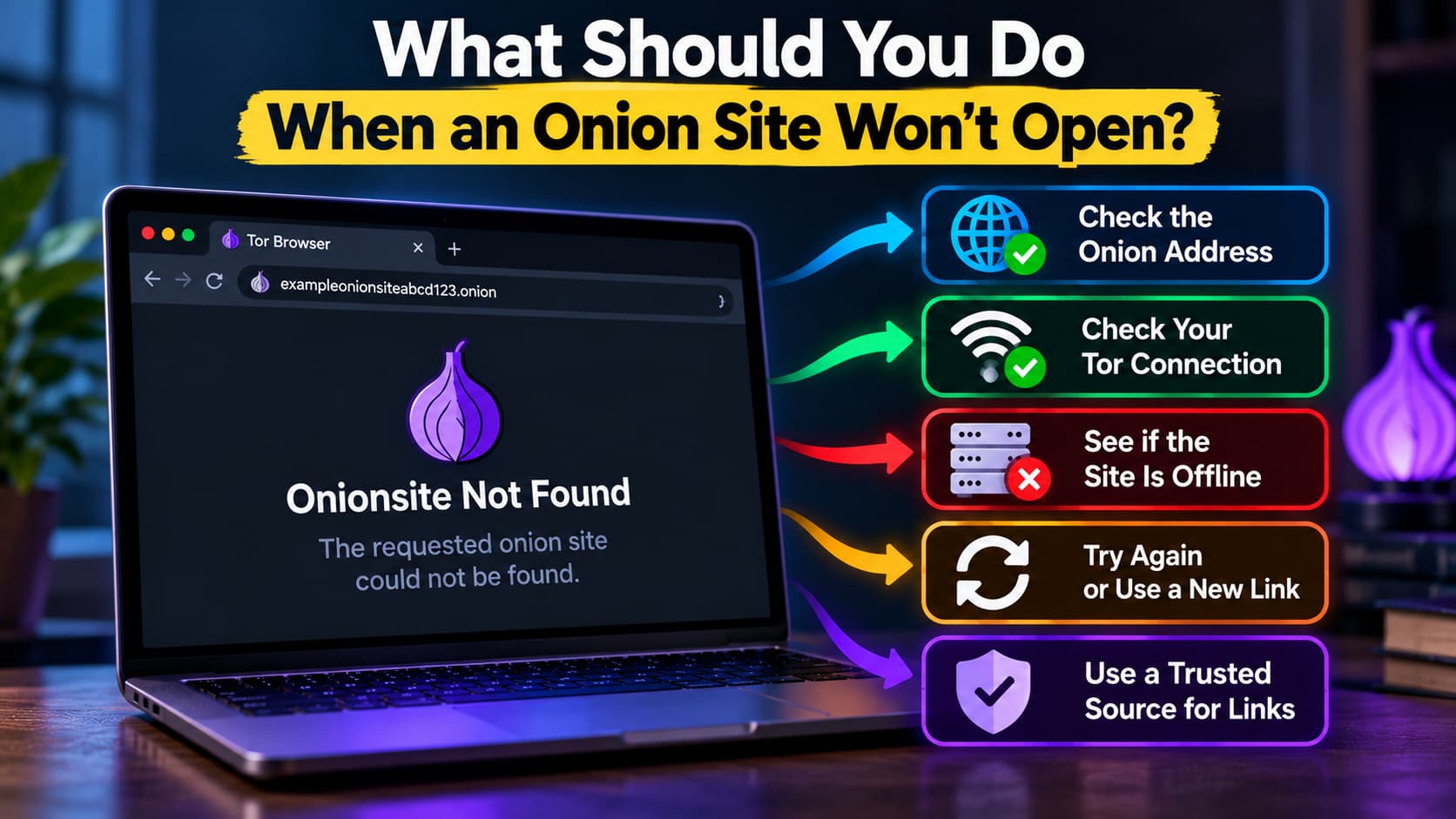
What Should You Do When an Onion Site Won’t Open?
When an onion site won’t open, avoid immediately assuming that Tor Browser is broken or that the site has disappeared. A few simple checks can help narrow down where the problem actually is.
1. Check the .onion address carefully.
Compare the entire address with the source you obtained it from. With long v3 onion addresses, a single incorrect or missing character can prevent you from reaching the intended service.
2. Confirm that Tor Browser is connected.
Make sure Tor Browser has successfully connected to the Tor network. If Tor itself isn’t connected properly, changing or retrying individual onion addresses won’t solve the underlying problem.
3. Try another reputable onion service.
Open another known onion service using an address published by a trustworthy source. If several unrelated onion services also fail, investigate your Tor connection. If they work normally, the problem is more likely specific to the original address or service.
4. Check whether the address is obsolete.
If you obtained the link from an old article, bookmark, forum post, or directory, it may no longer be current. A short 16-character onion address is particularly important to notice because legacy v2 onion services are no longer supported by modern Tor Browser.
5. Look for an officially published onion address.
If the service belongs to an organization with a regular website, check that organization’s official website or documentation for its current .onion address. This is more reliable than searching randomly for a supposedly “new” or “working” link.
6. Don’t weaken Tor’s security settings just to make an unknown site load.
An inaccessible onion service isn’t a good reason to disable security protections, install unfamiliar software, or follow questionable instructions from a third-party website. Those changes won’t bring an offline onion service back online and may introduce unnecessary risk.
7. Consider that the onion service may simply be unavailable.
If Tor is connected, other onion services work, and you’ve verified that you’re using the correct address, there may be nothing to fix on your side. The service could be temporarily offline, undergoing maintenance, experiencing a technical problem, or no longer operating at that address.
Common “Onionsite Not Found” Questions
Why Was an Onion Site Working Yesterday but Not Today?
An onion service can become temporarily unavailable even if it worked normally a few hours or days earlier. The server hosting it may be offline, undergoing maintenance, experiencing connectivity problems, or dealing with a configuration issue.
A sudden failure therefore doesn’t necessarily mean the .onion address has changed or the service has permanently disappeared. If other onion services are working normally and you’ve confirmed the address is correct, trying the site again later may be worthwhile.
Can a .Onion Address Expire?
A .onion address doesn’t expire in the same way a conventional domain registration such as a .com can expire.
Onion addresses aren’t registered and renewed annually through a traditional domain registrar. However, the service associated with an onion address can stop operating. An operator can shut it down, lose the necessary cryptographic keys, replace it with another service, or simply stop maintaining it.
So an old onion address may become permanently unusable even though the address itself didn’t “expire” like a regular domain name.
Why Do Some Onion Sites Load While Others Don’t?
Each onion service operates independently. One can be online and functioning normally while another is experiencing downtime or has disappeared completely.
If several reputable onion services load successfully but one particular address doesn’t, that’s a useful indication that your Tor connection is working and the problem may be specific to that address or service.
If many unrelated onion services aren’t loading, checking your Tor connection and network environment makes more sense.
Does Changing Tor Circuits Fix “Onionsite Not Found”?
Not necessarily.
Changing circuits can establish a different route through the Tor network, which can help with certain connection problems. But it cannot make an onion service available if the service itself is offline or if you’re using an incorrect or obsolete .onion address.
If the same verified onion address remains unreachable while other onion services work normally, repeatedly requesting new circuits is unlikely to solve a problem occurring on the service’s side.
Can a VPN Fix an Onion Site That Isn’t Available?
A VPN cannot bring an unavailable onion service back online.
A VPN changes how your device reaches the internet before connecting to Tor, depending on your setup. It does not repair the remote onion service, correct an invalid address, or restore a server that has been shut down.
If your network is blocking or interfering with Tor, Tor’s own connection options, including bridges, are designed for situations where direct Tor access is difficult. But if Tor is already working and only one onion site is unavailable, adding a VPN doesn’t fix that site’s availability.
How Do I Know If an Onion Site Moved to a New Address?
Don’t assume that the first address labeled “new onion link” is the legitimate replacement.
If the onion service belongs to an organization that also maintains a regular website, check its official website, documentation, or other established official channels for an announcement or currently published .onion address.
If you cannot find confirmation from a trustworthy source, treat the supposed replacement as unverified. An old address becoming unavailable doesn’t authenticate any new address claiming to replace it.
Are Old Onion Links Dangerous to Use?
An old onion link isn’t automatically dangerous simply because it’s old. It may just point to a service that no longer exists.
The bigger concern is what happens after you discover that the old link doesn’t work. Searching through unknown directories or following unofficial “replacement” links can expose you to misleading or impersonating sites.
There is another reason to pay attention to age: very old 16-character v2 onion addresses belong to a retired onion-service protocol and aren’t supported by current Tor Browser versions.
For an onion service that still operates today, the safer approach is to obtain its current address from an official or otherwise trustworthy source rather than assuming an old link—or an unofficial replacement—is still valid.
Final Thoughts
“Onionsite Not Found” is better understood as a connection failure than an explanation of what happened to a website.
Tor Browser may be working normally while one particular onion service is offline. The address may have changed, the service may be experiencing temporary problems, or the link you found may simply be outdated. The error alone doesn’t tell you which explanation is correct.
That’s why checking the wider picture matters. If other onion services work, your Tor connection may be fine. If the address came from an old article or directory, verify whether a current address has been published. And if a service remains unreachable, don’t assume that the first “new” onion link you find is its legitimate replacement.
For services operated by identifiable organizations, use their official websites, documentation, or other established sources to verify onion addresses whenever possible.
An unavailable onion service can be inconvenient. Following an unverified replacement can create a much bigger problem.
When the address can’t be verified, it’s better to leave the link untrusted than guess where the service moved.